
Your portfolio was never scattered — it was unmeasured.
TEFAS funds, BIST and US equities, ETFs, your crypto holdings and your private pension contract on one screen. Net of tax and costs — what you are actually left with.
No sign-up — we email the installer on request.
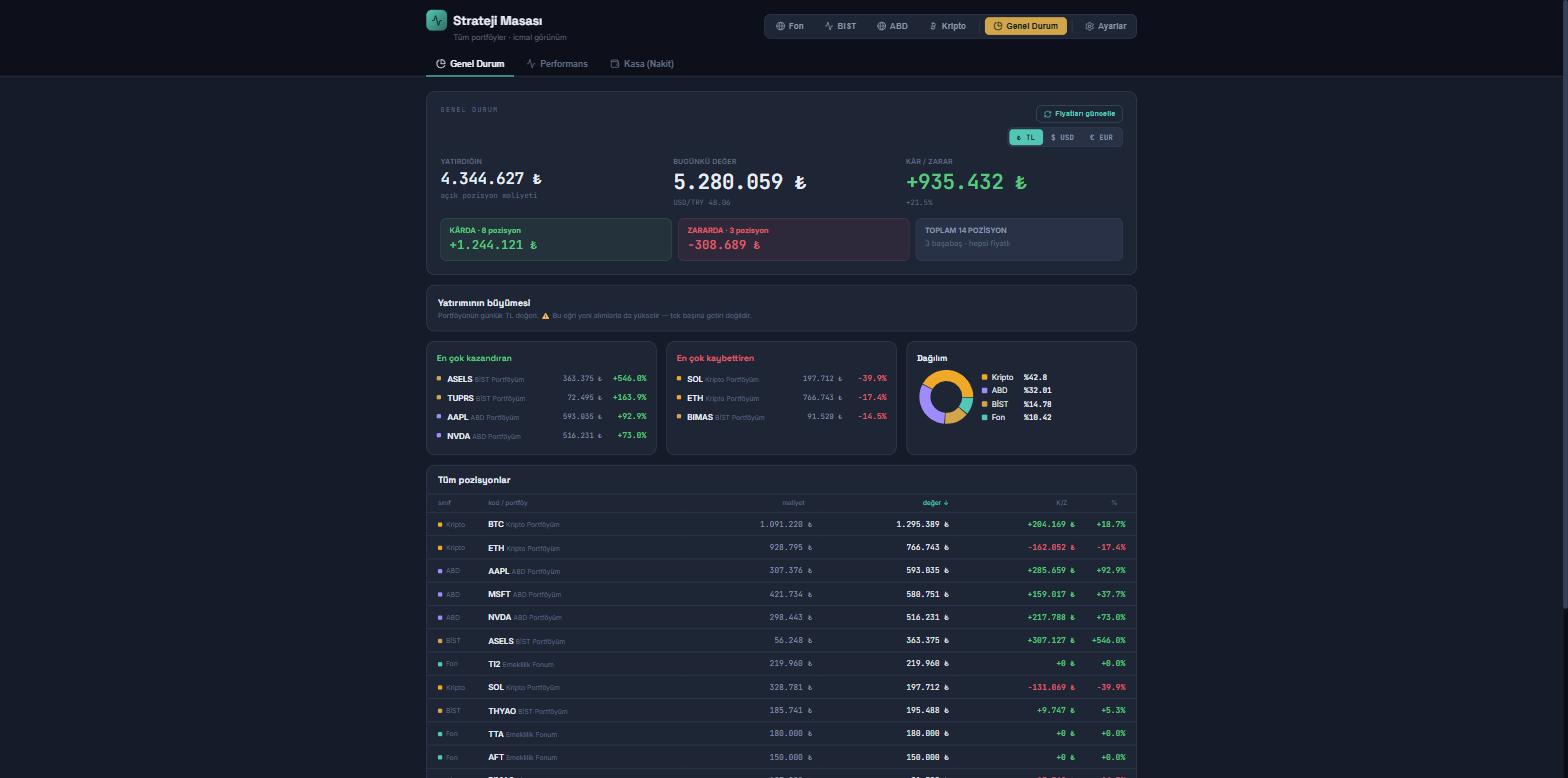
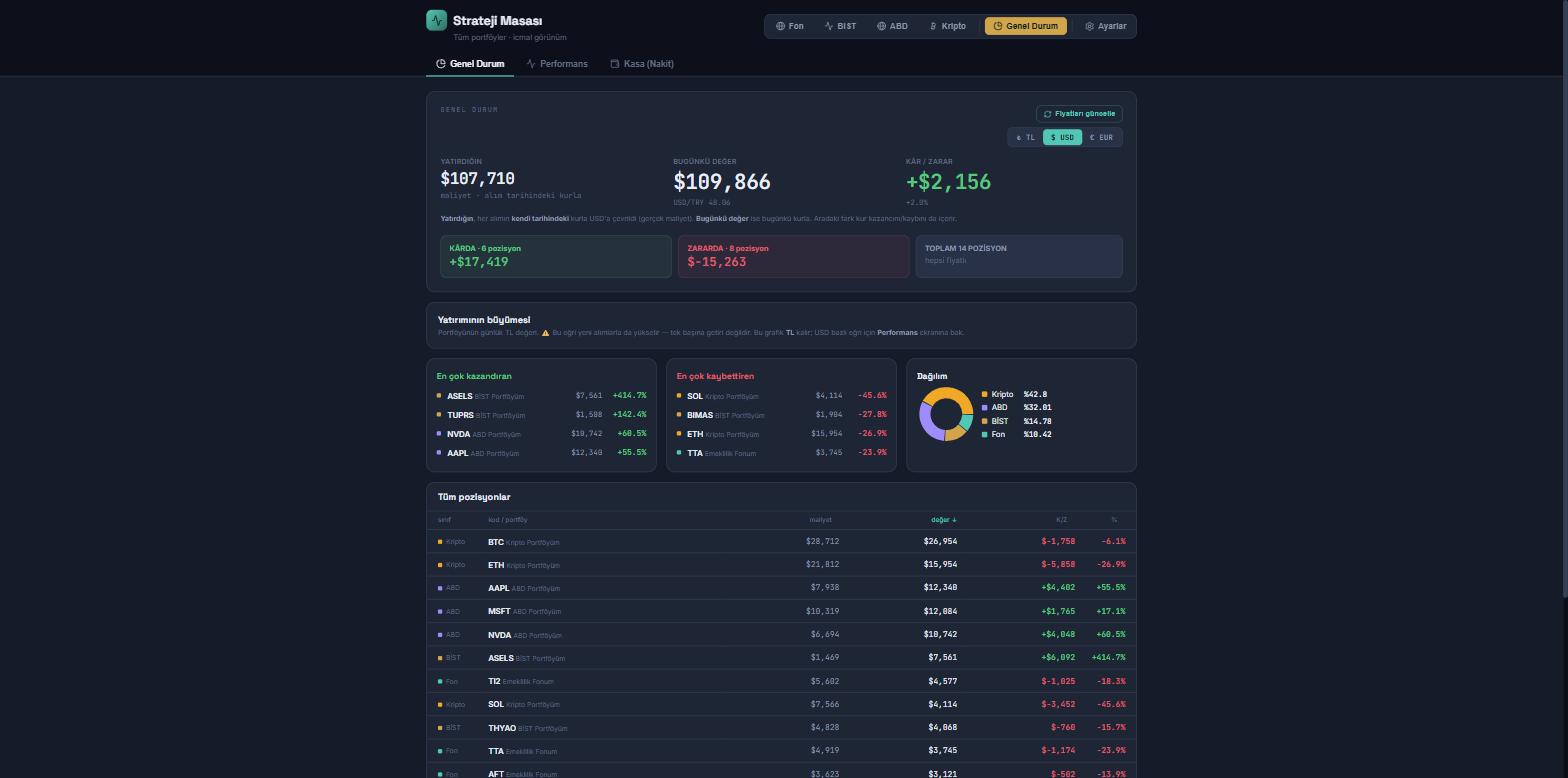
What is Strategy Desk? A personal investment decision-support application that brings TEFAS funds, BIST and US equities, ETFs, crypto holdings and your private pension (BES) contract onto one screen, shows gains net of tax and costs, and runs on your own computer.
The product promises no outcome: it provides measurement and decision support. The portfolio in every screenshot on this page is illustrative; the figures reflect market data at the moment the image was captured.
Do you really know how much you have made?
The product was written to correct three concrete measurement errors.
The answer is given gross
Broker screens show gross figures: fund withholding, commission, BSMV and sales tax are not deducted. Strategy Desk calculates what each position would actually pay out if sold today. The withholding rate is selected automatically from the purchase date of the fund.
A nominal TRY return carries no information
In a high-inflation economy “I made 40%” means nothing on its own. The app also shows returns in real (after-inflation) and dollar terms.
FX assets get the wrong cost basis
A common error: converting the cost of a dollar-denominated asset at the current rate. That invents a cost that was never paid and erases the FX gain from profit. Strategy Desk converts every purchase at the rate of its own date — the money you actually paid.
What is on that one screen?
- Whole portfolio on one screen
TEFAS funds · BIST · US equities · ETFs · crypto — a single summary.
- Net of tax and costs
Withholding by purchase date; commission, BSMV and sales tax included.
- TRY / USD / EUR view
The entire portfolio in the chosen currency; cost at the purchase-date rate.
- Real and dollar-based return
Alongside nominal TRY: after inflation and in USD terms.
- Macro-based allocation
Target allocation derived from rate, inflation, FX and geopolitical-risk inputs.
- Fund scorecard
A fund percentile against its peers — within its own category.
- Fund holdings (KAP)
Which equities a fund holds, and what it bought or sold since last month.
- A measured track record
“Does buying last month winner work?” — answered with 60 months of real data.
- Partial sales and realised P/L
Sell with manual lot selection; realised profit is reported separately.
- Private pension (BES) contract
Vesting schedule, exit tax, contribution ledger and fund allocation.
- BES fund proposal
Macro-based allocation across 400 pension funds plus a “swap what for what” list.
- BES rights counter
How many of the 12 annual fund-switch rights are left.
- Excel/CSV import
Bring your existing portfolio in with a single file.
- Individual or corporate tax
Individual withholding or corporate tax, set per account.
Where we cannot measure, we say so
Most tracking tools treat missing data as zero and confidently show you a wrong number. Strategy Desk excludes a position whose price is missing, never converts a purchase at an invented rate, produces no ranking when peers are too few — and each time it tells you why.
It will not show a position P/L as “0” — it says “the price for this position could not be retrieved, it was excluded from P/L”.
If the rate for a purchase date is unknown, that record is left out of the totals and the reason is stated.
If a fund has too few peers, no percentile is produced. Where there is no data to separate funds, it writes “we have no data that distinguishes the funds in this category” — it does not invent a ranking.
The 60-month real outcome of “buy last month top performer” is on screen — net of tax and switching costs.
If it finds a faulty record it shows it and proposes a correction, but never changes the user entry quietly.
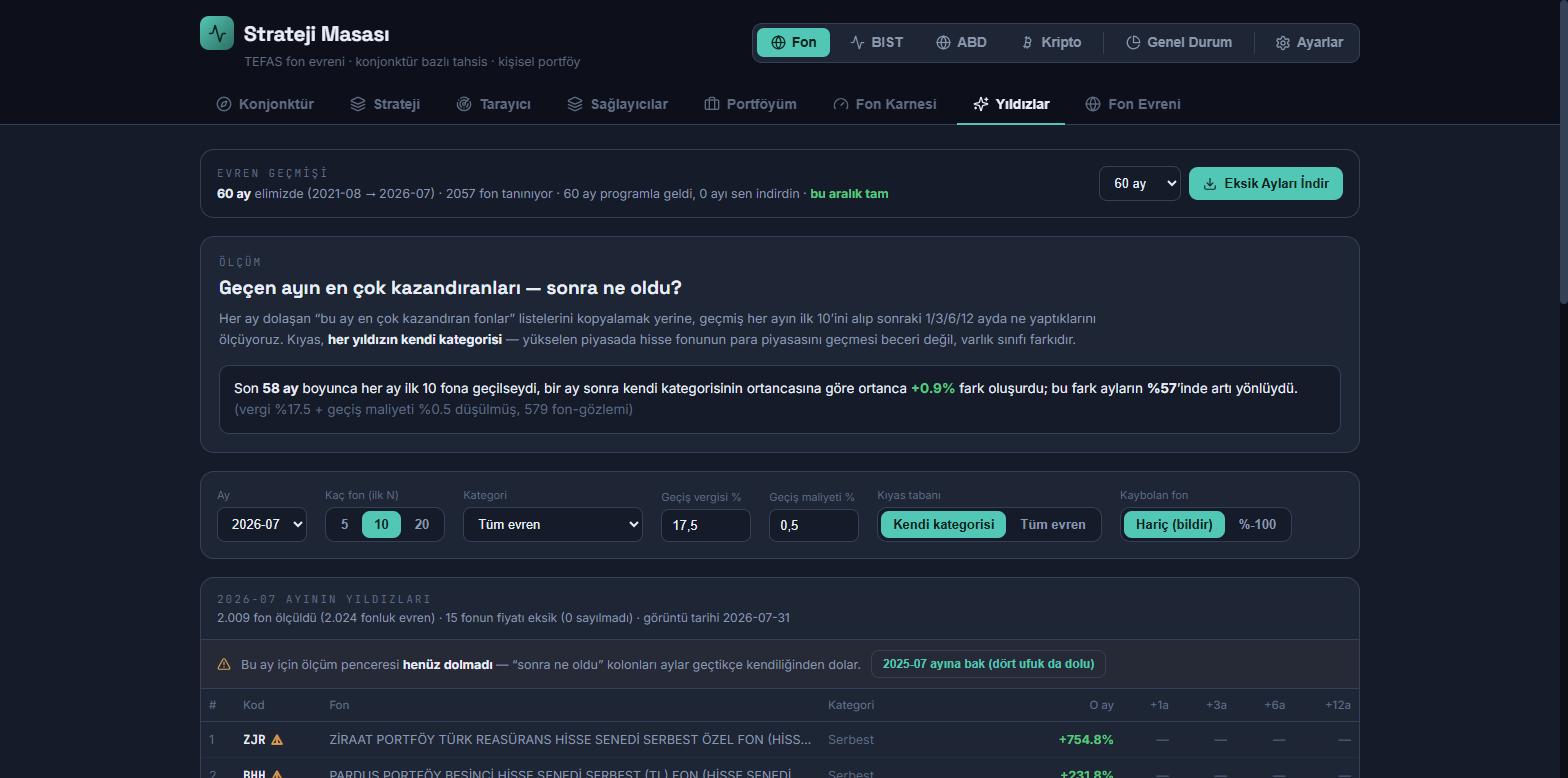
“Software that does not know what it does not know will show a wrong number with confidence. Strategy Desk does not stay quiet where it cannot measure — it tells you.”
You supply the inputs, the rules produce the allocation
Policy rate, inflation, FX trend and geopolitical risk feed the allocation engine. When the inputs change the target allocation recalculates itself, and candidate funds are listed for each category. The final decision belongs to the user.
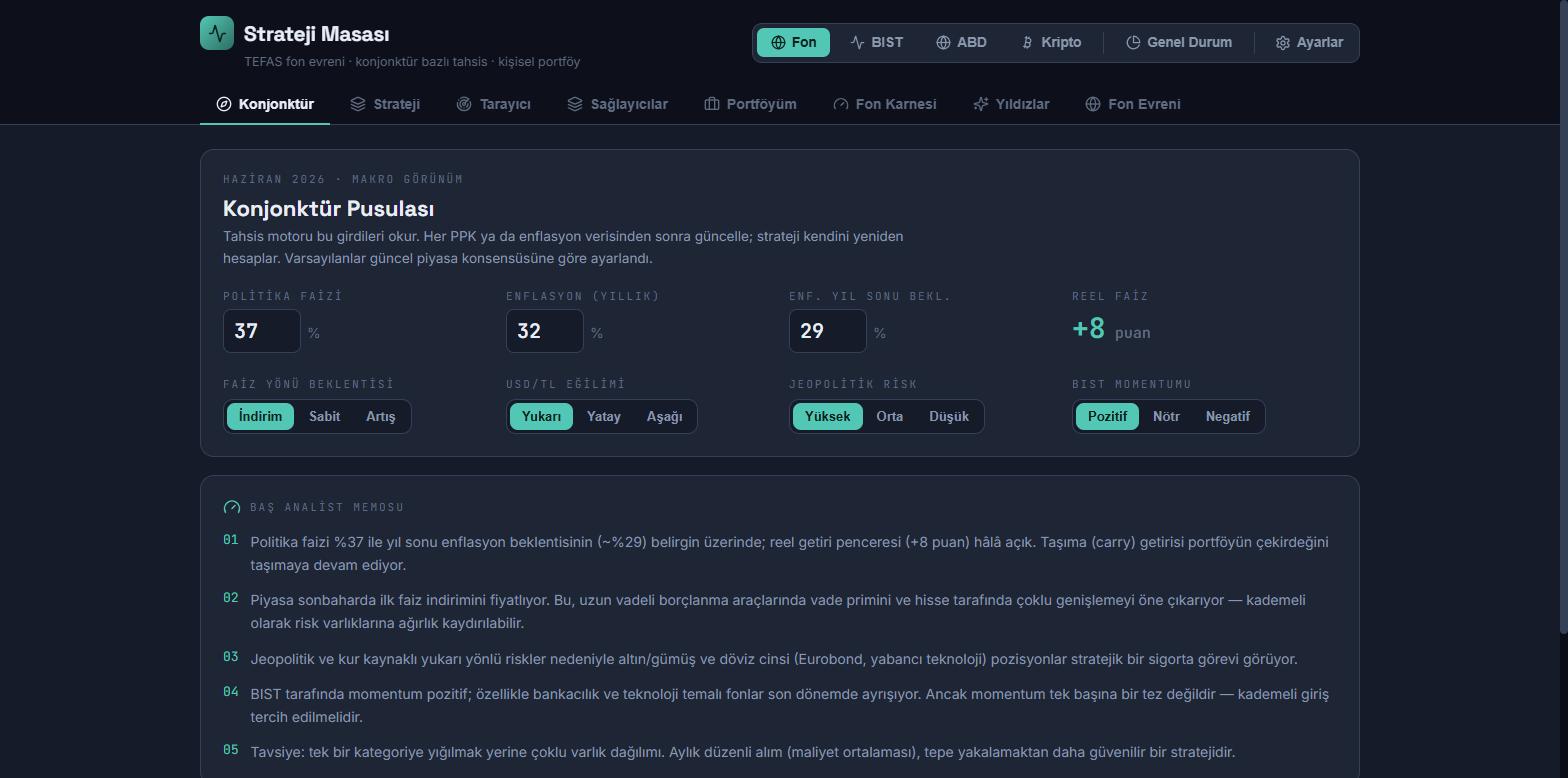
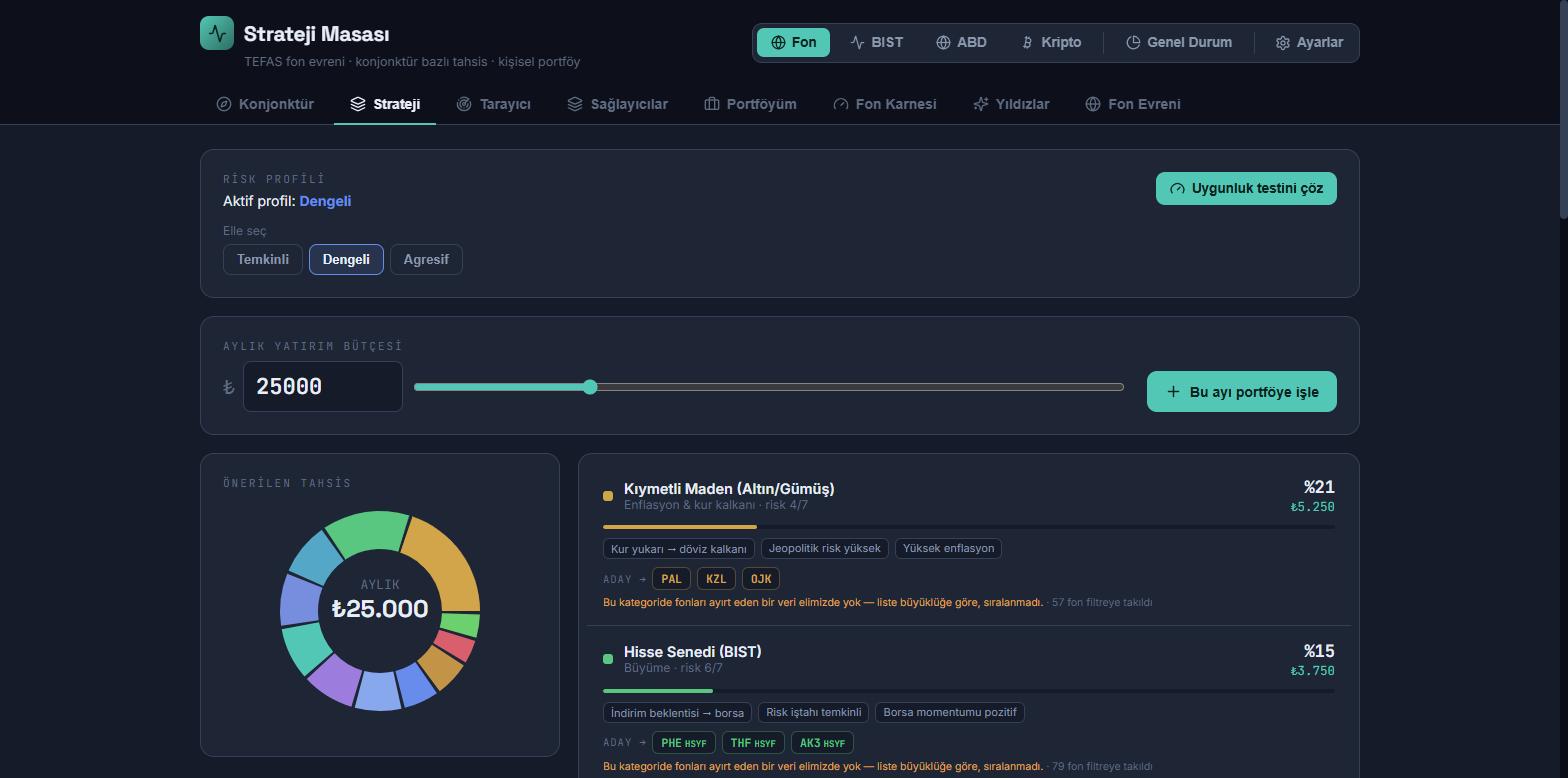
The app lists candidates and proposes an allocation; it produces no buy/sell signal. Where a category has no data to distinguish funds, it states so on screen.
The same portfolio, in dollar terms
The whole portfolio can be viewed in TRY, USD or EUR. Cost is converted at the rate of each purchase date; current value uses the current rate. The difference appears separately as FX gain or loss.
How much of your pension is actually yours?
A large part of the state contribution is not yours until your vesting period is complete — yet most screens add it to the total and show one number. Strategy Desk shows vested and unvested amounts separately and calculates, with tax, what you would receive if you exited today. It proposes an allocation across 400 pension funds and tells you what to swap for what — while tracking how many of the 12 annual fund-switch rights are left.
- Vesting schedule
How much of the state contribution is vested, and how many years to the next tier.
- Unvested contribution on its own line
In the sample screen, ₺52,700 of the ₺62,000 state contribution is not yet vested — shown separately, in a different colour.
- What you get if you exit today
Exit withholding by duration and age, applied to the gain only.
- Contribution ledger
Enter the definition once; the app builds the 10-year ledger itself. Skipped months and extra contributions can be corrected by hand.
- Allocation across 400 pension funds
A macro-based target allocation plus a “what to swap for what” list.
- The 12-rights-a-year counter
Switching funds in a BES costs no money; the scarce thing is the right. The app shows how many are left.
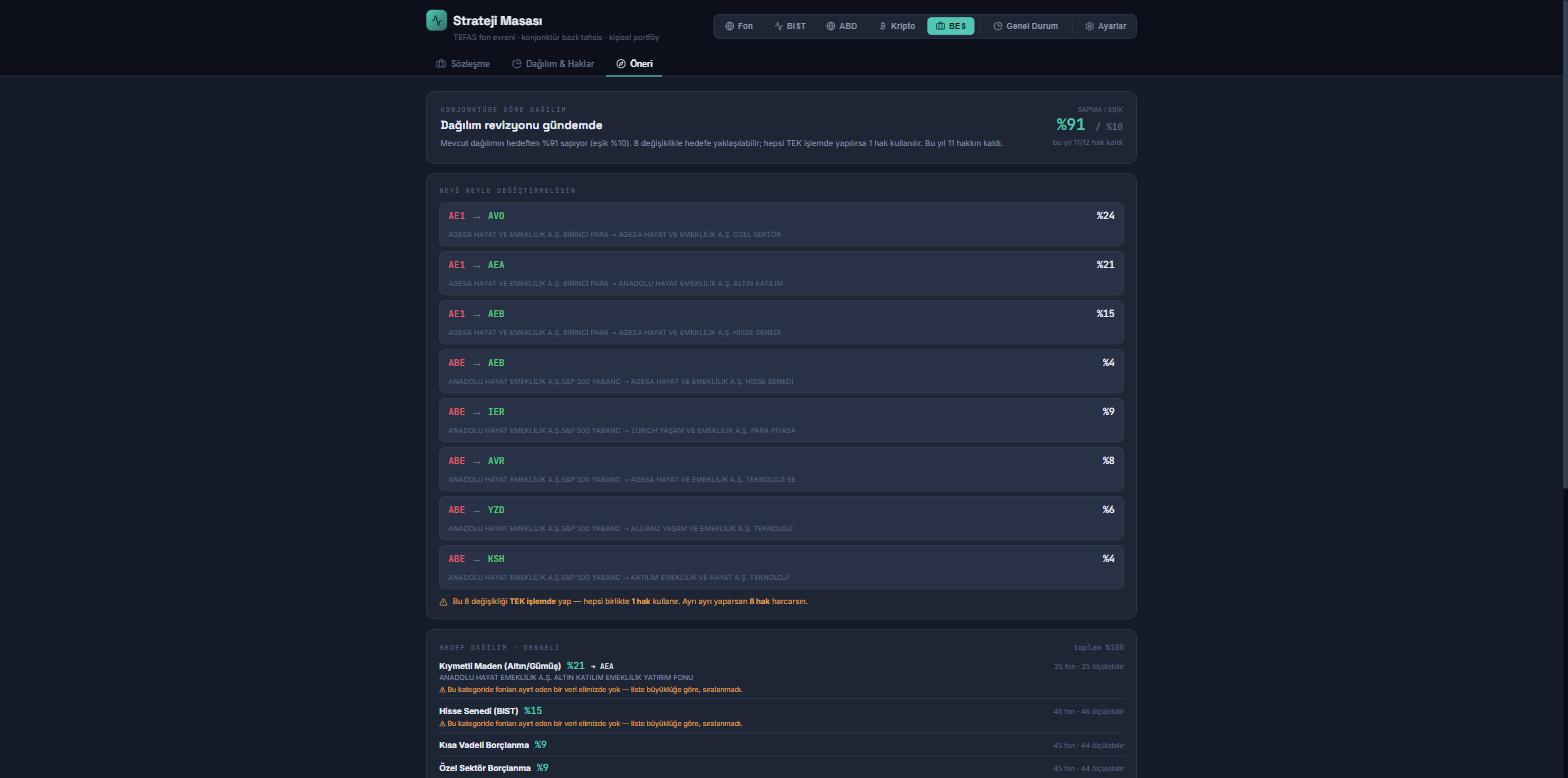
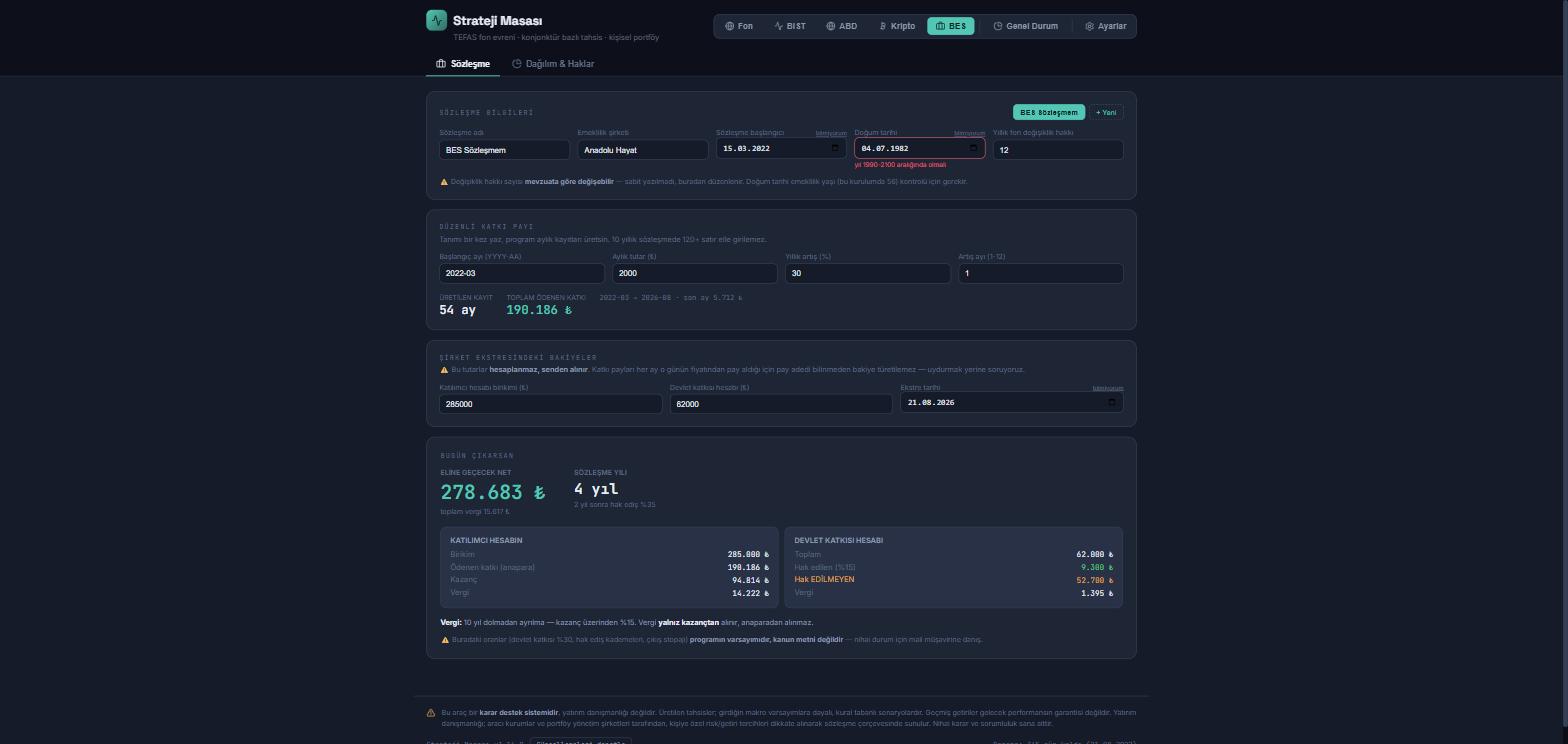
The state contribution rate, cap, vesting tiers, exit withholding and the annual number of switch rights are verified against official sources and are not hard-coded — parameters are updated when the legislation changes. The rates on screen are the assumptions of the app, not the text of the law; consult your accountant for your own situation.
Your data stays with you
Strategy Desk runs on your own computer. Your portfolio is not sent to the cloud and you do not need an account. One file, no installation.
Who is it for?
Setup and data
- Runs on your own computer
A single .exe file, no installation required.
- Portfolio data never leaves your disk
Data stays with the user.
- No account, no membership, no password
There is no sign-up or authentication step.
- Windows ready, macOS available
The macOS package runs on Intel/Rosetta.
- One-click updates
Updated from inside the app; user data is untouched.
Where do the numbers come from?
- TEFAS
2,000+ mutual funds and 400 pension (BES) funds; daily prices and fund size.
- KAP
Monthly fund portfolio disclosure reports — which equity is held, and how much.
- Yahoo Finance / İş Yatırım
BIST and US equities, ETFs and FX rates.
- CoinGecko
Crypto prices (USD and TRY).
30 days free — no sign-up
The app starts its 30-day trial by itself on first launch. The remaining days are shown on screen, and no data is deleted when the trial ends.
30-Day Trial
Download, run, use. There is no form or account step; we email the installer on request.
- Every feature open for 30 days
- Enter your own portfolio, test it with your own data
- Remaining days shown on screen
- No data deleted at the end — price updates and new entries stop
- Enter a licence key and it continues where it left off
Annual Subscription
Every feature stays open; unlimited portfolios and transactions, updates included.
- Unlimited accounts, holdings and transactions
- Macro-based allocation, fund scorecard and KAP holdings
- Pension module: vesting, exit tax, fund proposal and rights counter
- PDF and Excel report output
- All updates during the year and email support
The licence is bound to the machine and works offline. The price covers one year of use and excludes VAT. Talk to us about multi-user corporate use.
Strategy Desk, in detail
Try it free for 30 days
No sign-up, no form. Request the installer and test it with your own portfolio.
Strategy Desk is a decision-support tool, not investment advice. The measurements and comparisons on its screens do not constitute a buy or sell recommendation. Past returns are no guarantee of future performance. Investment advice is provided by brokerage firms and portfolio management companies, taking the risk and return preferences of each person into account. The final decision and responsibility rest with the user. The portfolio data in the screenshots on this page is fictitious.